Businesses often notice weak email archiving rules only after auto-delete removes the message they need to prove what was agreed. For SME owners, operations managers, finance leads and compliance-conscious decision-makers, that makes missing email records a business problem, not an inbox clean-up task.
Auto-delete clears clutter. It can also remove the message trail a business later needs to prove what happened. You need clear rules on what you keep, how long you keep it, who retrieves it and who can access it when someone needs an answer fast.
At TrustLayer, we give organisations a searchable archive they can use when they need a record back, so they do not waste time rebuilding the history from scattered inboxes and deleted threads.
To see how a more structured archive could work in your environment, book a demo.
Why does auto-delete become a business problem?
Auto-delete feels harmless when people treat old emails as a storage issue. The problem usually appears when one of those emails turns out to be the only record of a business decision.
That email might be the only proof that a customer accepted revised terms. It might show that finance approved a payment exception. It might confirm that a supplier received a deadline change. HR may later need it to check who said what and when.
Once auto-delete removes that email, clutter stops mattering. The business has lost part of the record it needs to explain what happened.
Staff should not decide retention one mailbox at a time. The business needs a consistent approach before useful records disappear during mailbox clean-up.
TrustLayer Mail keeps that archive available, so the business can still access the thread quickly when someone needs proof, an approval trail or the record of what was sent.
What is the difference between deletion, backup and email archiving?
Many businesses treat deletion, backup and email archiving as if they do the same job. They do not.
Deletion removes messages from normal access. Staff may delete them by hand. Mailbox rules or retention settings may clear them later.
Backup helps restore systems after failure or accidental loss. It helps bring the environment back. It does not always help someone find one message quickly when a dispute, audit or internal issue is already on the table.
Email archiving keeps business messages in a controlled, searchable record so people can retrieve them later. It helps the business recover the email history it needs when someone asks what happened.
The difference matters when someone needs one message fast. A deleted message may be hard to get back. A backup may not help someone find the thread in context. Email archiving keeps the record available and easier to find.
We help businesses keep a searchable archive they can use when someone needs one message fast, instead of relying on mailbox habits and scattered retention settings.
Where do email archiving rules usually break down?
Many retention failures start in ordinary places.
Some businesses never define which emails they need to keep. Others turn on auto-delete without checking how people actually use email across finance, sales, support or management. Shared inboxes sit with no clear owner, so nobody checks what auto-delete removes until someone asks for a missing thread. Staff delete messages they think nobody will need again. Leavers’ mailboxes disappear before anyone checks what must stay. In other cases, the archive exists, but nobody can search it fast enough to use it.
The result is an incomplete record.
One part of the business keeps everything. Another deletes too much. A manager assumes finance has the thread. Finance assumes it sits in a shared inbox. By the time someone tries to piece the history together, part of the record has already gone.
Weak rules stay hidden until the business needs one message and cannot get it back.
What should an email archiving policy cover?
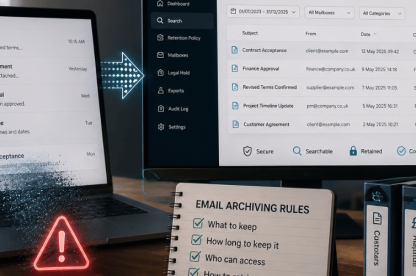
Clear rules should spell out what the business keeps, who controls access and how someone gets the record back when they need it fast.
They should state which categories of email the business must keep, so nobody has to guess what counts as a record worth preserving. That often includes customer communications and approval records. It may also include supplier negotiations, finance records, HR records, or mail linked to regulated activity.
They should explain how long different categories stay available, based on contracts, sector obligations, data protection duties and, where needed, professional advice. The policy should match how the business actually operates, not a generic template copied in from elsewhere.
They should also define who can access archived messages and who can approve retrieval. They should explain how deletion exceptions work and how someone searches archived mail when a record is needed quickly.
Clear rules only help when the archive supports them. TrustLayer Mail makes those records searchable and easier to retrieve, so the business can respond faster when someone asks for an answer.
Leavers’ mailboxes need clear rules too. If someone leaves the business, the company should not delete the mailbox by default while it still holds records the business may need later, such as approvals, customer history or supplier exchanges.
The policy should also cover shared inboxes. These often hold some of the most important threads in the business, but many organisations still treat them as if nobody owns them.
Why do shared inboxes and manual deletion create extra risk?
Shared inboxes often show the problem first.
A shared inbox may hold the only usable record of what was agreed. When nobody owns retention, nobody checks what auto-delete removes. The same problem appears when staff manage mailbox cleanup themselves. One person deletes heavily while another keeps everything. Someone else saves mail into a personal folder nobody else can access.
Storage is often the easier part. Finding the record when someone needs it is harder.
Email archiving rules need to reflect how people actually work. If communication flows through shared inboxes or delegated access, the policy has to account for that. If it does not, the business keeps creating gaps in its own record.
This is where a structured archive starts to matter. We keep shared-inbox history searchable and retrievable, so the business does not lose the thread when ownership is unclear.
Why do email retention rules fail as a business grows?
Growth changes the way email moves through the business.
New staff join and shared inboxes expand. New systems appear. Customer volumes rise, and approval chains become more complex. Finance or HR may carry more risk than they did two years earlier. Old mailbox rules then stop matching the way the business actually works.
Businesses need to review these rules regularly.
A practical review starts with a few questions:
- Which emails now hold business-critical decisions or evidence?
- Do current mailbox settings match those communication patterns?
- Can the business still retrieve archived messages quickly enough?
- Do leavers’ mailboxes, shared inboxes and delegated access rules still make sense?
- Do retention settings match contracts, sector duties, data protection responsibilities and external advice?
If nobody can answer those questions clearly, the business is still relying on mailbox habits instead of real control.
As the business grows, TrustLayer Mail gives businesses a clearer way to manage retention and retrieval across expanding inboxes, changing ownership and more complex communication flows.
What does better email archiving look like in practice?
Once the business stops relying on mailbox habits, the archive becomes easier to control. The business knows what it keeps, who can retrieve it and how to recover the record when someone needs an answer fast.
The business can then place auto-delete inside a wider set of rules that define what stays and what must still be recoverable later. That gives it a more reliable way to keep the records it still needs before mailbox habits remove them.
People do not have to guess where the record sits. Shared inboxes stop falling between departments, and a deleted mailbox does not erase useful history. The archive keeps the message available when someone needs it for a dispute, an audit or an internal review.
We give organisations a more structured, searchable archive, so they can retrieve the record they need without wasting time rebuilding the history.
For a related TrustLayer view on what retained communication records look like under pressure, see this article.
To see how TrustLayer can help you keep the records you may need later, book a demo.
FAQs
What are email archiving rules for business?
These rules define which messages the organisation keeps and how long it keeps them. They also set who can access them and how people retrieve them when needed.
Is auto-delete the same as email archiving?
No. Auto-delete removes messages after a set period. Archiving keeps messages in a controlled record so people can retrieve them later.
Why is backup not enough for email retention?
Backups mainly help restore systems after failure or loss. They do not always let people search, review and recover individual business records in context.
Why should SMEs review email retention policies?
SMEs should review email retention policies because communication habits change as the business grows. Old mailbox rules may no longer match real business workflows.